The Pi Agent Setup I Actually Use
July 26, 2026 · 4 min read
Hey everyone, it's been a while. I've been very busy with work and lately haven't done much on the side other than going to the gym like a madman.
Today I wanted to showcase my Pi agent config.
This work has been heavily inspired from This Video by Ben Davis.
Installation
If you want to try the setup, start by installing the configuration. Back up your existing agent directory first if you already have one:
||
The reusable pieces that ship as packages are installed through Pi:
The remaining extensions are local: they live inside the repository under extensions/, so cloning the configuration installs them too. Pulling updates for them is a git pull.
The extensions are intentionally small, which makes it easy to keep only the parts you actually want:
pi-ask-useradds multiple-choice questions;pi-background-terminalsmanages long-running terminal processes;pi-codex-fastenables fast mode for supported Codex models;pi-codex-usagedisplays Codex quota usage;pi-dictateprovides local WhisperX dictation;pi-file-searchadds fastfdandrgtools;pi-git-infosupplies Git status for the dashboard;pi-goalruns long-lived goals;pi-idle-notifysends desktop notifications;pi-model-inforeports model and context information;pi-subagentsprovides delegation and takeover views;pi-ui-customizationreplaces the footer with my dashboard; andpi-theme-github-dark-defaultprovides the theme.
The setup is still very much my setup. Remove anything you do not need, and edit settings.json for your own models, notifications, and package selection.
A footer that tells me what's going on
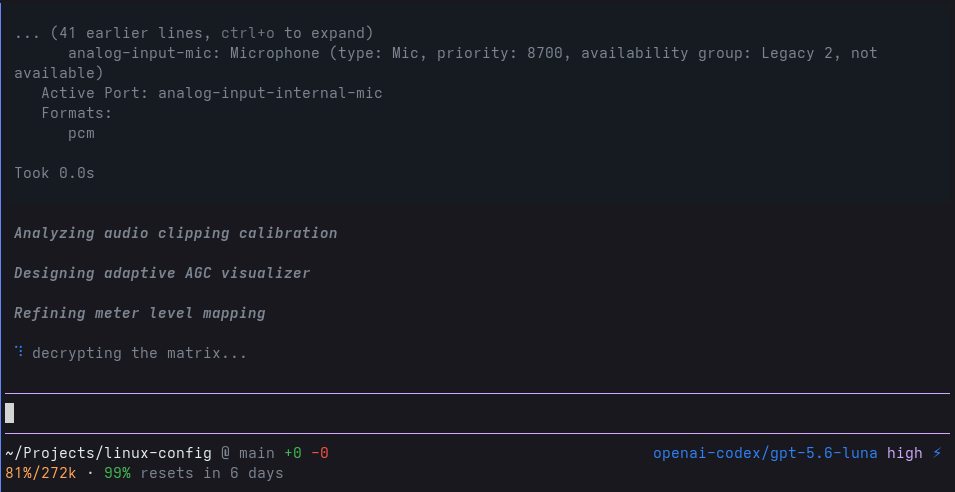
The first thing you notice is probably the UI customization extension. It replaces the default footer with a small dashboard showing the things I usually want to see while a session is running:
- the current working directory and Git branch;
- additions and deletions in the current repository;
- the active model and reasoning effort, including fast mode;
- context utilization; and
- Codex usage.
The theme comes separately from pi-theme-github-dark-default and is selected as github-dark-default in settings.json. Extensions use semantic theme colors instead of embedding their own ANSI values, so everything still looks coherent when the palette changes. Splitting the theme out also means I can update it with the same pi update --extensions command.
Subagents
Pi does not need to ship with a subagent system for every task. I added one because I like having background agents around for focused jobs: reviewing a file, checking an assumption, or exploring an unfamiliar part of a repository while I keep working in the main session.
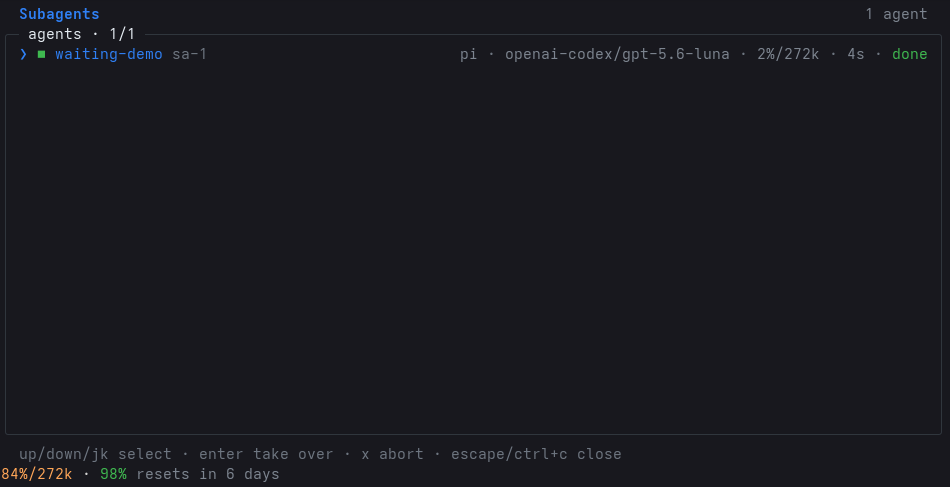
The pi-subagents package supports Pi sessions in-process and has backends for Codex and Claude where those runtimes are available. The /sa command opens a picker and a takeover view for inspecting running agents without losing the main conversation.
Goal mode
The pi-goal package builds a longer-running loop on top of the subagent system. /goal keeps the main chat active while the task continues, persists its state in the Pi session, and uses a subagent for independent final verification when one is available.
The interface is deliberately small: use /goal <objective> to start one, /goal without an objective to inspect it, and Escape to stop it like any other running agent turn. An unfinished goal resumes after a restart. There are no turn or token budgets, pause states, or extra lifecycle commands; it just keeps working until it completes or I stop it. Completion is evidence-gated too: the agent has to call goal_complete with concrete evidence instead of simply saying that it is done.
This is a nice example of why the package split is useful. The goal extension can evolve independently from the subagent extension while still using its service when it is installed. It stays focused on one real need instead of becoming a general automation framework.
Notifications and small conveniences
The idle-notify extension sends desktop notifications when Pi finishes, asks a question, hits an error, or needs permission. They include a short preview and stay quiet while the terminal is focused, which makes them useful for background work without turning into another stream of noise.
It currently targets my GNOME setup, so it may need a little adaptation on another desktop environment.
The rest of the repository is intentionally smaller. The three active skills are:
background-terminalsfor starting and managing long-running commands;ponytailfor keeping coding solutions minimal and dependency-light; andsubagentsfor local delegation.
Larger domain-specific skills live under skills-disabled. They are available when needed, but do not add prompt weight or automatic behavior to every project.
I hope this little post is useful to people looking to improve and personalize their Pi experience.
See you soon! :)